

An honest, feature-by-feature look at Capsule CRM – what it does well, where it falls short, and who should actually use it.
When you’re searching for a small business CRM, Capsule CRM is bound to come up. It markets itself as simple, affordable, and refreshingly clutter-free, a breath of fresh air in a market full of bloated enterprise tools trying to do absolutely everything.
But does simplicity actually serve you? Or does it mean missing the features your business genuinely needs to grow?
We put Capsule CRM through its paces across contact management, pipeline tracking, automation, email integration, support, and pricing. This Capsule CRM review gives you the full picture; no fluff, no filler, so you can make the right call for your team. If you’ve been browsing multiple capsule crm reviews, this guide cuts through the noise with a clear, unbiased breakdown.
What Is Capsule CRM?
Capsule CRM is a cloud-based customer relationship management platform built for small and medium-sized businesses that want to manage contacts, track deals, and handle client relationships, without the complexity of enterprise-grade tools.
Founded in Manchester, UK in 2009, Capsule was built with one philosophy: make CRM simple again. Over the years, it has evolved carefully, adding smarter workflows, mobile access, and a growing integration ecosystem, while keeping its minimalist core intact. Today, it serves consultants, agencies, small SaaS teams, and B2B service businesses that prioritise relationship-driven sales over heavy automation.
Think of it as the anti-Salesforce. Where most CRMs try to impress you with hundreds of features and dashboards, Capsule asks: what do you actually use every day? Then it gives you just that.
| Quick Take: Capsule CRM is best for small teams and consultants that want to manage client relationships cleanly, without a steep learning curve. It’s not the right tool if you need two-way email sync, advanced automation, or robust follow-up tracking out of the box. |
Curious to see if it fits your team? Try Capsule CRM free for 14 days – no credit card required.
Key Features of Capsule CRM
Capsule doesn’t try to overwhelm you with hundreds of modules. It focuses on making the things you do every day faster and cleaner. Here’s a detailed look at what you actually get.
| Feature | Capsule CRM |
| Mobile App | ✅ Android & iOS (offline) |
| Contact Management | ✅ Up to 30,000 (Starter) |
| Follow-up Tracking | ❌ Not available |
| Sales Pipelines | ⚠️ 1 on Starter; 5 on Growth |
| Two-Way Email Sync | ❌ Not on any plan |
| Workflow Automation | ⚠️ Growth plan and above |
| Email Sequences | ❌ Requires Transpond add-on |
| CRM Dashboards | ⚠️ Advanced reporting on Growth+ |
| Duplicate Management | ✅ Available |
| Browser Extension | ✅ LinkedIn, Gmail, Outlook, WhatsApp |
| Integrations | ✅ 70+ apps + Zapier |
| Free Plan | ✅ Up to 2 users, 250 contacts |
| Free Trial | ✅ 14 days (all paid plans) |
| Phone Support | ❌ Not available on any plan |
| Live Chat Support | ❌ Not available |
1. Contact & Lead Management
Capsule keeps all your contacts and organisations in one clean, centralised tab. You can import contacts via Excel, migrate from another CRM, or capture them automatically using the browser extension (compatible with LinkedIn, Gmail, Outlook, and WhatsApp).
Each contact record includes details, project notes, opportunity values, tasks, activity logs, files, outreach emails, and internal comments. It covers the essentials well. However, compared to more modern CRMs, it does feel lean – there’s no AI-assisted enrichment on lower tiers, and the contact enrichment feature is locked to the Advanced plan only.
The Starter plan allows up to 30,000 contacts, more than sufficient for most small businesses. The Free plan caps this at just 250.
2. Sales Pipeline Management
Capsule’s pipeline is built around the Kanban board, drag-and-drop cards, visual stages, and a clean overview of where every deal stands. If you prefer a more data-driven perspective, there’s a list view with filtering options too.
One genuinely useful feature is Stale Opportunities, similar to Pipedrive’s deal rotting. You can define how many days it takes for an opportunity to go stale (globally or per milestone), so deals that slip through the cracks get flagged before it’s too late.
| Worth noting: The Starter plan limits you to just one sales pipeline. For businesses managing multiple products, regions, or client types, this is a real constraint. You’ll need the Growth plan ($38/user/month) to unlock up to five pipelines. |
3. Task & Activity Management
Capsule offers solid basic task management. You can create tasks across standard categories – call, email, meeting, follow-up, send, or define custom types. Tasks appear in both a calendar and a list view, automatically organised by deadline. The Home page surfaces your overdue tasks, today’s tasks, and what’s coming up in the next seven days.
Capsule sends daily email reminders for upcoming tasks and colour-codes them by deadline, which gives it a feel closer to a follow-up tracker than a basic task list. That said, it’s still not a true follow-up tracking system. If tracking next actions at a contact level is core to how your team sells, you’ll feel the gap.
The task creation process is also slightly more involved than it needs to be, multiple fields and drop-downs where simpler CRMs just let you type and go.
4. Email Integration
This is arguably Capsule CRM’s most significant limitation. There is no two-way email sync, not on the Starter plan, not on Growth, not on any plan.
You can connect your Gmail, Google Workspace, Microsoft 365, or Outlook account and send emails directly from within Capsule. Sent emails and their content are logged automatically. But emails that contacts send back to you will not appear in the CRM.
The workaround is Capsule’s BCC drop box feature. You get a unique Capsule email address, and you forward incoming emails to it manually. The forwarded emails are then logged against the relevant contact record.
| If email communication is central to your sales process, the manual BCC workaround quickly becomes a time-consuming and error-prone frustration. This alone is a dealbreaker for many small businesses. |
On the plus side, Capsule’s AI Content Assistant, available from the Starter plan – helps draft polished emails in seconds. You describe what you want to say, pick a tone, and the assistant generates a relevant draft. It’s a useful addition for teams that send a lot of outbound emails.
5. Workflow Automation
Capsule does offer native workflow automation, but only from the Growth plan ($38/user/month) upward. On the Free and Starter tiers, automation simply does not exist.
When you do access it, you can configure triggers and actions: automatically assign opportunities to team members, create projects, send follow-up emails, and more when specific events occur. It handles the basics and reduces routine admin, but it doesn’t scale especially well for complex or multi-step workflows.
For email sequences specifically, you’ll need Transpond, Capsule’s email marketing add-on. This is a separate, paid tool starting at $11/month, which adds to your total cost if email nurturing is part of your sales process.
6. Mobile App
Capsule’s mobile app, available on both iOS and Android, is a genuine strong point. It supports offline access, meaning you can update opportunities, log calls, and manage tasks without an internet connection. For field sales teams or consultants constantly on the move, this is genuinely valuable.
The iOS version also displays caller IDs for CRM contacts even if their number isn’t saved on your phone, a small but practical feature for client-facing teams. There’s also a map view for locating nearby contacts, useful when planning client visits in a new city.
7. Dashboard & Reporting
Capsule offers activity reports and sales reports. The Sales Pipeline dashboard displays your conversion rate, pipeline stage breakdown, revenue forecast, and key opportunity metrics. For most small businesses, this gives you enough to make informed decisions without drowning in data.
However, Reporting Dashboards, Activity Reporting by Team, and more advanced analytics are locked to the Growth plan and above. On the Starter plan, the reporting capability is fairly basic.
8. Integrations
Capsule integrates with over 70 business apps through its marketplace, covering the essentials: Gmail, Outlook, QuickBooks, Xero, Mailchimp, Transpond, and Zapier. Via Zapier, you can connect to 1,000+ additional tools, which meaningfully extends the platform’s reach.
The integration ecosystem isn’t as extensive as HubSpot or Pipedrive, but it covers what most small businesses need to get started without friction. Slack, Google Workspace, and accounting tools are all well covered.
Ease of Use
Capsule CRM’s biggest competitive advantage might simply be how easy it is to use. The interface is clean, the navigation tabs are logically named, and there are no overwhelming dashboards to wade through before you can do something useful.
New users get short onboarding video guides immediately after sign-up, plus a walkthrough video from a Capsule customer success manager. The learning curve is genuinely minimal, most users are productive within a day, not a week.
The drag-and-drop pipeline, an ‘Add’ button visible on every screen, and lean contact pages mean there’s no hunting around for basic functions. For small business owners who don’t want to become CRM power users just to manage their pipeline, this approachability is a real selling point.
A minor gripe: the colour coding on profiles and task labels is decorative rather than functional, which adds visual noise without adding meaning. It’s a small thing, but it’s the kind of design choice that makes you wonder about the attention to detail on the platform’s more critical features.
What Real Users Are Saying
Capsule CRM receives consistently positive reviews across major platforms, particularly from small business owners and consultants who appreciate its simplicity. Here’s how the numbers look:
| Platform | Rating | Review Count | Focus |
| G2 | 4.5 / 5.0 | 1,102 reviews | Overall CRM |
| Capterra | 4.4 / 5.0 | 1,883 reviews | Overall CRM |
What Users Love
Simplicity That Actually Delivers
Across G2 and Capterra, the most common praise is that Capsule does exactly what it promises without the bloat. Users consistently describe it as “easy to set up,” “intuitive from day one,” and “the CRM I actually want to open.” For small businesses burned by overly complex tools, this experience carries real weight.
Fast and Reliable Performance
Loading speed and platform stability get consistent mentions in positive reviews. For a CRM you’re opening dozens of times a day, this matters more than it might sound.
Clean Client Data Management
Users highlight how straightforward it is to store, access, and update client data. The organised contact records, activity logs, and opportunity pages give sales reps a clear picture of every relationship without digging through noise.
Responsive Customer Support
Multiple Capterra reviewers praise Capsule’s support team as fast and helpful — a notable contrast to many CRM platforms where support is a pain point. This is particularly valued by smaller teams who don’t have an in-house IT team to troubleshoot issues.
What Users Criticise
Feature Depth Falls Short for Growing Teams
The recurring theme in critical reviews is that Capsule works well at the start, but starts to feel limiting as businesses grow. Larger teams flag the lack of advanced reporting, the cap on pipelines at lower tiers, and the absence of two-way email sync as areas where the platform doesn’t keep pace.
Reporting Feels Basic
Several reviewers across G2 and Capterra note that the analytics and reporting options are “somewhat limited” compared to competitors. For data-driven sales teams, the inability to build custom dashboards or access team-level reporting without upgrading to Growth is a frustration.
Training Resources Geared Towards Admins
A recurring comment is that Capsule’s onboarding and training materials are primarily useful for account administrators, and less immediately helpful for everyday sales users getting up to speed on the platform. New team members occasionally find themselves figuring things out independently rather than being guided.
Capsule CRM Pricing – Is It Worth It?
Like most detailed capsule review breakdowns, pricing plays a key role in understanding whether the tool actually delivers value.
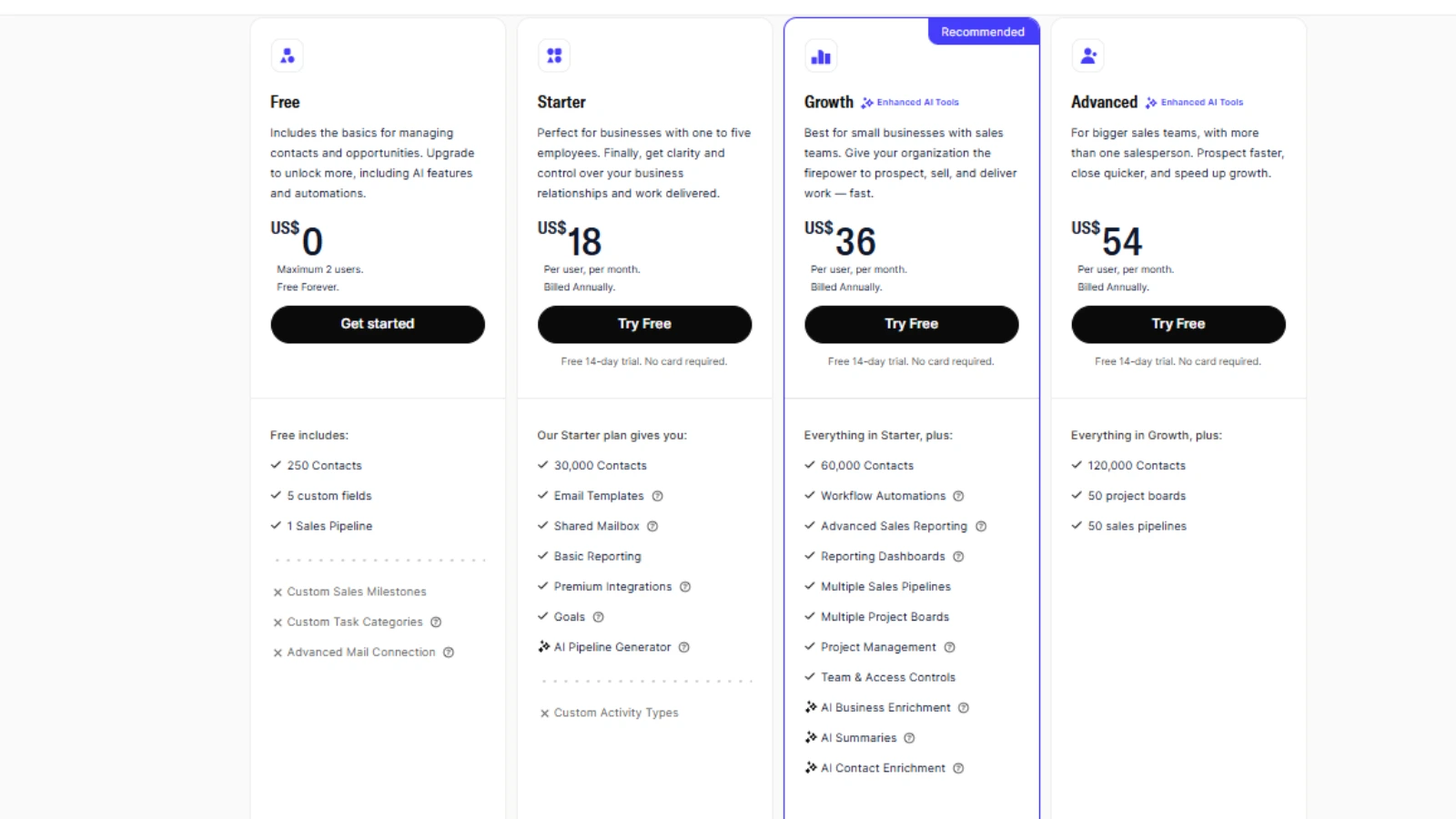
Capsule offers four tiers, with monthly and annual billing options. Annual billing comes with a discount, so it’s worth committing if you’ve tested the tool and are confident it’s the right fit.
Breaking Down the Value at Each Tier
Free Plan – Worth Trying, Not Worth Staying
The Free Plan is a legitimate way to test Capsule without commitment. Two users, 250 contacts, one pipeline, and basic features give you a real taste of the platform. But 250 contacts is too small a limit for any business that’s been operating for more than a few months. It’s a starting point, not a long-term solution.
Starter – $18/user/month
The Starter plan is competitively priced for what it includes: 30,000 contacts, email templates, the AI email assistant, shared mailbox access, and basic reporting. For very small teams with straightforward sales processes, this covers the essentials.
The problem is what it’s missing: no workflow automation, only one pipeline, no two-way email sync, and no email sequences without paying extra for Transpond. For businesses that need more than the absolute basics, the Starter plan forces an upgrade fairly quickly.
Growth – $36/user/month
The Growth plan is where Capsule starts to make sense for teams that take their CRM seriously. Workflow automation, up to five pipelines, advanced sales reporting, and team access controls unlock meaningful functionality. However, the jump from $21 to $38 per user is significant; you’re effectively doubling your per-seat cost to access features that many competing CRMs include at their entry tier.
And even at this price point, two-way email sync still isn’t available, and email sequences still require Transpond on top.
Advanced – $54/user/month
The Advanced plan adds contact enrichment, 50 project boards, and expanded contact limits (120,000). For agencies managing a large number of client relationships, the enrichment features and expanded project management capabilities may justify the cost.
| Pro Tip: Capsule offers a 14-day free trial on all paid plans. Test the Growth plan specifically, that’s where the full feature set becomes visible. If automation and multiple pipelines are important to your team, you’ll know within the trial whether the $38/user price point is worth it for you. |
Is Capsule CRM Affordable for Small Business?
At face value, $21/user/month looks reasonable. But the value proposition weakens when you factor in the feature gaps. You’re paying Starter tier pricing for a feature set that competitors often include in their lowest tiers, then potentially doubling costs at Growth for functionality that should arguably be standard.
Add Transpond for email sequences ($11+/month) and you’re building a tech stack that costs more than CRMs offering all these features natively. For small businesses on tight budgets, that adds up quickly.
Capsule CRM Pros and Cons
| PROS | CONS |
| ✓ Clean, user-friendly interface — minimal learning curve | ✗ No two-way email sync on any plan |
| ✓ Fast loading speed across desktop and mobile | ✗ No follow-up tracking — only basic task management |
| ✓ Mobile app works offline (Android & iOS) | ✗ Only 1 pipeline on the Starter plan |
| ✓ Free plan available for up to 2 users | ✗ No workflow automation on Free or Starter tiers |
| ✓ 70+ integrations via the app marketplace | ✗ Email sequences require paid Transpond add-on ($11+/month) |
| ✓ Browser extension for contact capture (LinkedIn, Gmail, Outlook, WhatsApp) | ✗ No phone or live chat support on most plans |
| ✓ Affordable Starter plan at $21/user/month | ✗ Steep jump from Starter ($21) to Growth ($38) per user |
| ✓ Strong G2 (4.5/5) and Capterra (4.4/5) ratings | ✗ Contact enrichment locked to the Advanced plan only |
Capsule CRM Alternatives – How Does It Compare?
It is a solid option for specific use cases, but it’s not the right tool for everyone. Here’s how it stacks up against the leading alternatives in 2026:
| Factor | Capsule | Breakcold | Pipedrive | Salesmate | LinkedIn Learning |
| Free Plan | ✅ (2 users) | ❌ | ❌ | ❌ | ✅ via libraries |
| AI Features | Basic email AI | Full AI-native | AI deal guidance | ❌ | ❌ |
| Email Sync | ❌ No 2-way | ✅ | ✅ | ✅ 2-way | ✅ |
| Automation | Growth+ only | All plans | Growth+ | All plans | All plans |
| Best For | Simple B2B / SMBs | AI-driven sales | Pipeline mgmt | Mobile teams | Professional visibility |
| G2 Rating | 4.5/5 | 4.7/5 | 4.3/5 | 4.6/5 | N/A |
Capsule CRM vs. Breakcold
Breakcold is the AI-native CRM built for how modern sales teams actually work. Where Capsule requires manual admin to keep records updated, Breakcold automates lead movement, task creation, and contact organisation based on your real interactions across email, LinkedIn, WhatsApp, and Telegram.
For teams that spend significant time on social selling or outbound prospecting, Breakcold’s unified inbox, social engagement stream, and AI-powered workflows represent a materially different category of tool, not just a faster version of Capsule. If admin work is eating into your selling time, Breakcold is worth a serious look.
Capsule CRM vs. Pipedrive
Pipedrive was built by salespeople, for salespeople. It delivers a more feature-rich pipeline experience than Capsule, with AI deal guidance, custom forecasting, performance dashboards, and 350+ integrations. Full two-way email sync is available from the Growth plan onward, which is a significant advantage over Capsule.
Pipedrive has no free plan, and its interface can feel less intuitive than Capsule’s for non-technical users. But for sales-driven SMBs that have outgrown a basic CRM, Pipedrive offers substantially more depth without requiring enterprise-level investment.
Capsule CRM vs. Salesmate
Salesmate is the go-to option for mobile-first teams. Its built-in calling and SMS features, combined with two-way email sync and sales automation on all plans, make it significantly more complete than Capsule for teams managing high-volume outreach. The mobile app mirrors the desktop experience faithfully, a genuine advantage for field sales reps and remote teams who need full CRM functionality on the go.
Final Verdict: Is Capsule CRM Worth It in 2026?
After analysing features, pricing, and real user feedback, this capsule review makes one thing clear.
Capsule CRM earns its reputation as one of the cleanest, most approachable CRMs on the market. If you’re a consultant, small agency, or B2B service business that wants to organise client relationships without spending a week learning a new platform, Capsule delivers on that promise.
The interface is genuinely pleasant to use. The mobile app is one of the better ones in this category. The onboarding is fast. And for teams that have been managing client relationships in spreadsheets or email inboxes, Capsule is a meaningful step up.
But simplicity has a ceiling. The absence of two-way email sync on every single plan is a fundamental gap that no workaround fully solves. The automation lockout on the two cheapest tiers means basic workflow efficiency costs extra. And the pricing jump from Starter to Growth, doubling your per-seat cost for features that many competitors include by default, raises a legitimate question about value.
Capsule CRM Is a Good Fit If You:
- Run a small B2B service business or consultancy with straightforward sales processes
- Prioritise ease of use and a minimal learning curve above all else
- Are comfortable using BCC for email logging and don’t rely on two-way sync
- Need a single pipeline on a tight budget to start with
- Want offline mobile CRM access for on-the-go client management
Look Elsewhere If You:
- Rely heavily on email and need full two-way sync – consider Pipedrive or Salesmate
- Want AI-native automation and social selling tools – consider Breakcold
- Need workflow automation without upgrading to a mid-tier plan
- Manage multiple product lines or regions requiring several pipelines from day one
- Expect live chat or phone support for immediate help when issues arise
Bottom line? Capsule CRM is a tool that does what it says on the tin, nothing more, nothing less. In 2026, where automation and AI are increasingly standard, that minimalism is both Capsule’s greatest charm and its greatest limitation. It’s a great starting point; just make sure you’re honest about where your business is heading before you commit.
Start Your Free 14-Day Capsule CRM Trial →
Frequently Asked Questions About Capsule CRM
1. Is Capsule CRM free?
Yes. Capsule offers a Free Plan for up to 2 users with a limit of 250 contacts and access to one pipeline. It’s useful for freelancers or very small teams testing the platform. Paid plans start at $18/user/month (Starter).
2. Does Capsule CRM integrate with Gmail and Outlook?
Yes. Capsule integrates with Gmail, Google Workspace, Microsoft 365, and Outlook. You can send and log emails directly from the CRM. Note that there is no two-way sync — incoming replies from contacts will not appear in Capsule automatically.
3. Does Capsule CRM have workflow automation?
Workflow automation is available, but only on the Growth plan ($36/user/month) and above. It is not included in the Free or Starter tiers. For email sequences specifically, you’ll need the Transpond add-on, which is priced separately.
4. What are the best Capsule CRM alternatives in 2026?
- Breakcold – Best AI-native CRM for social selling and automated lead management
- Pipedrive – Best for sales-focused teams needing advanced pipeline management and email sync
- Salesmate – Best for mobile-first teams needing built-in calling and SMS
Each alternative brings a different edge, depending on whether you value AI automation, pipeline analytics, or mobile usability most.
5. How secure is Capsule CRM?
Capsule encrypts all data using TLS 1.2 during transmission and stores it in ISO 27001-certified data centres. The platform supports role-based permissions and two-factor authentication for added account security.
Editorial Disclosure: This review is based on independent research and analysis. All opinions are our own.